Quickstart
Build and solve your first decision model in the five-step New Model wizard, using a small bakery as the worked example.
This is one pass through the New Model wizard, start to finish, on a business small enough to check by hand: a bakery with one oven, two products and a weekly flour delivery. Fifteen minutes, most of it waiting.
You need nothing but a description. No spreadsheet, no data file.
Open New Model
In the left rail, click New Model. Step 1 opens on "Tell us a bit about your business". Click Next.
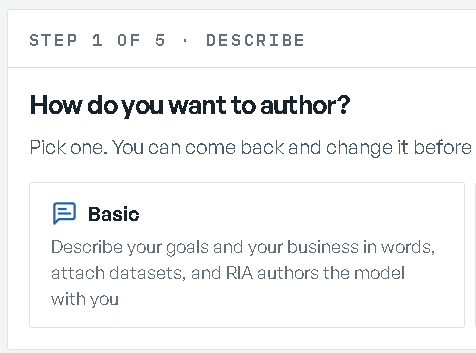
The screen asks "How do you want to author?" Pick Basic — describe your goals and your business in words, and RIA authors the model with you. (Advanced is for bringing a model you already have; see Building models.)
Name it
On Name your model, type Harbor Point Bakery. Next creates the model — it is in your
Model Library from this point on.
Say what you want and how the business runs
You land on Describe your problem. Fill in two of its three rows; leave the datasources row alone, because this model runs on its own numbers.
Describe your goals → What to optimize is a sentence: pick Maximize and type
weekly profit. Then Hard limits completes "Hard limits I'm aware of in my model are
that":
the oven runs at most 60 hours a week, and we take one flour delivery of 40 kg a week.
Save, then Finish.
Describe your business is one textarea:
We are a single-location bakery with one oven. We bake sourdough loaves, which sell for $8 and take 0.5 kg of flour, 0.25 oven hours and $2 of other ingredients each, and croissants, which sell for $4 and take 0.1 kg of flour, 0.1 oven hours and $1 of other ingredients each. We can sell at most 100 loaves and 300 croissants a week.
Finish returns you to the hub, each row now carrying a summary of what you said. Next spends about 45 seconds "Reading what you told me".
Answer the questions
Step 2 opens on "A few questions before I build" with the scrutiny dial under "How closely should I question this?". Moderate is the default; for a model this small, Light — "One round of questions, then build." — is enough.
Now one question per screen, chipped REQUIRED or OPTIONAL, each with a Why this? you can open. For this brief they are things a baker would know and a description rarely says: how long the product keeps, whether that demand is an obligation or a forecast. Answer what you know, mark anything that does not apply Does not apply to this plan, and use ADD YOUR OWN for anything the questions missed.
Finish answering, then Next.
Confirm the design
Step 3 opens on Building, which lands on "The structure is built" in under a minute. Next opens Check the design: every section of the design on one page, each to confirm. (If the first row under Build reads Design drafted instead, the design is waiting for your sign-off before anything is built; see When the design is drafted first.)
For this model there are two to confirm. SCOPE lists what the model names — its products, its one resource and its processes. RULES reads the goal back as "Goal: highest profit" and every rule in plain English, including "oven runs at most 60 hours per period". DECISION, your own words played back, is there for reference.
Give each one a verdict: Confirm, or Needs correcting with a note saying what is wrong. When both read Confirmed, Next says Accept the design. Click it. The model finishes building while the wizard moves you on.
The Review row stays behind you as a read-only index of the design, with the design's downloads and the four readouts of what the build found; see Building models.
Skip the data load
Step 4 opens on "Now the numbers" and, for this model, has nothing to ask: "This model did not ask you for data" — "It runs on the numbers your description gave it. Next creates the baseline; you can load datasets later from the model page."
Next.
Solve the baseline
Your model shows what is about to be solved: DATASOURCES Sample data, TOPOLOGY
6 objects · 4 links, OBJECTIVE weekly profit (your goal, in your words), BASELINE TBD.
Next is Solve for your baseline, and it confirms first. Click Solve. It takes a few seconds and lands on "The baseline is solved"; Next reads it back.
Read your baseline
The last screen is "Your baseline" — "Does this read like your business?"
The bakery solves to $1,020 a week, labelled with your own goal — weekly profit — and it is
worth checking by hand,
because this is the whole point of a first model: 40 kg of flour is the binding limit, croissants
earn more profit per kg of flour than loaves do, so the plan sells all 300 croissants (30 kg) and
puts the remaining 10 kg into 20 loaves. $1,020.
Under THE NUMBERS IT TRACKS are the KPIs the model will carry from here on. For the bakery they read Bakery profit, Units baked, Oven utilization, Ingredient spend and Value of an extra oven-hour. Under them, Your model, described offers the model as built and solved: Download the workbook, Download the PDF, or Also as text (Markdown).
If the read-back does not match your business, Needs correcting takes a note and Send back returns the model to Clarify with it on the record.
Go to the model
Go to Model Overview ends the wizard. The model home keeps the whole record — your input, the accepted design, the data it used, the scenarios, the backlog — and the Base scenario is ready.
Open Scenarios and the STARTER WHAT-IFS cards propose the first questions worth asking. Clicking one stages it in the editor; nothing runs until you click Run scenario.
Next
- Core concepts — models, Base, scenarios, workspaces.
- Building models — every screen of the wizard, both modes, and the advanced imports.
- Scenarios and what-ifs — compare, diagnose, verify.
- Turn a losing week into a plan — the same five steps on a harder problem, with real books attached.